
Classify CSV Data with Jev and DuckDB
An audited input file and a clear integration checklist. The accompanying executable script is a CSV utility, not the DuckDB extension. The browser Content demo is a separate teaching exercise, not an equivalent implementation.
Use caseTurn CSV, documents, or search results into reviewable data
A source-first companion to Hamilton Ulmer’s DuckDB example, with a safe preparation checklist.
Source · Hamilton Ulmer · X companion
2026-09-21 · Editorial update; no live model call
Problem
Section titled “Problem”Copying a large table from a database into a separate prompt loses IDs, filters and context. The community idea here is to bring row classification closer to the data. This guide stops short of installing an unverified extension and instead prepares a small, inspectable input and output contract.
Make the round trip inspectable Read-only slice → ID + text → Preflight → Model / extension → Join by ID
Every input needs a result or an explicit error.
Before you begin
Section titled “Before you begin”-
Basic familiarity with tables and stable primary keys.
-
A local CSV or an authorized copy of a database extract.
-
Review the original post and its current repository before installing community code.
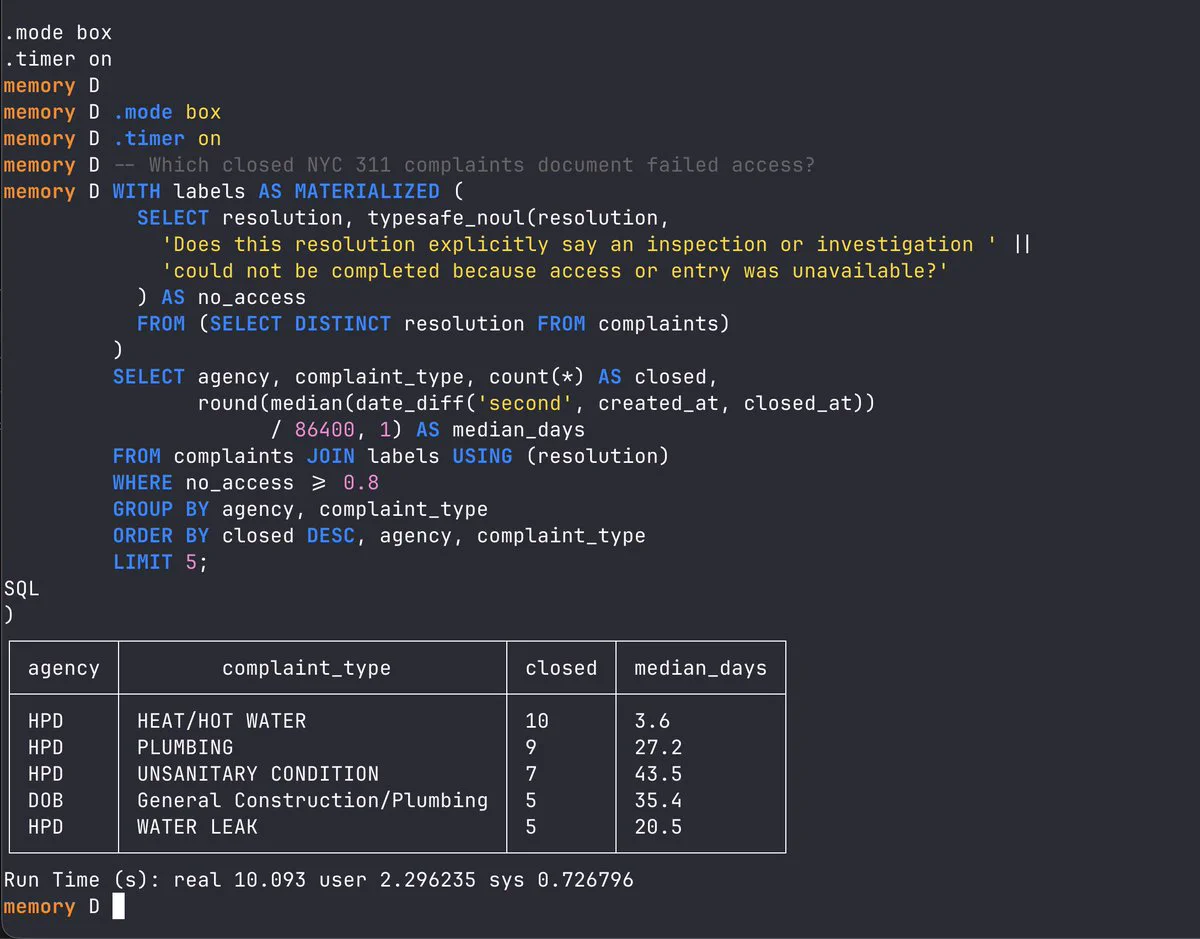
Image from Hamilton Ulmer’s original X post. The post is linked; this is not a JevLog test result.
1. Open the original source first
Section titled “1. Open the original source first”Follow the X link in Sources. Identify the current repository, installation instructions, license and supported database version. The source post could not be fetched directly during this review, so no extension name or installation command is guessed here.
2. Select a small, safe input
Section titled “2. Select a small, safe input”Export only the ID and text you need. Do not send an entire production table, credentials or unrelated fields. Record the number of selected rows before any classification step.
3. Audit the exported file
Section titled “3. Audit the exported file”Run the local CSV checker. It reports empty text and repeated messages without deleting them. Repeated text can belong to separate records; keep the IDs and use caching only when your application semantics permit it.
python scripts/prepare_csv.py examples/reading_list.csv --text-column summary4. Define an output that can be joined back
Section titled “4. Define an output that can be joined back”Require the original ID, a permitted label, the model version and an explicit error or review state. Preserve failed rows. A classifier result should never be accepted merely because the number of returned rows looks plausible.
5. Measure the whole workflow
Section titled “5. Measure the whole workflow”On a small non-sensitive test set, measure reading, request time, retries, writing and manual correction separately. This package does not provide a Jev/DuckDB extension or claim a speedup. Follow the original project for actual integration work.
Practice sample: download reading_list.csv (CSV Studio / local practice; not a live run here).
Design the join-back before the model call
Choose a stable primary key and export only the text required for the task. Save the selection conditions and input count. Sorting or retrying a table can change row positions, so a positional join is not a reliable way to attach decisions to the original data.
For every input ID, require a label or an explicit unresolved/error status. Retain the model identity and criteria version. A failed provider must not disappear through a filter that removes empty outputs. Repeated text may be cached for inference when your semantics permit it, but each original event still needs a corresponding result.
Read the actual community project linked from the author’s post before installing. Check its DuckDB version, package identity, license and outbound data. Executing from SQL does not prove that processing is local. This guide deliberately does not invent an extension installation command when the current package has not been verified.
Begin with the bundled CSV inspection utility, not a production database. When you do evaluate an integration, include reading, request construction, network time, retries, writing and review in the timing boundary. Preserve a small, inspectable result that can be joined back without guessing.
| ID | Label | State |
|---|---|---|
| R100 | AI & Automation | suggested |
| R101 | request_error | |
| R102 | needs_review | |
| R103 | Engineering | reviewed |
Proposed internal contract, not the external extension schema.
Result and cautions
Section titled “Result and cautions”An audited input file and a clear integration checklist. The accompanying executable script is a CSV utility, not the DuckDB extension. The browser Content demo is a separate teaching exercise, not an equivalent implementation.
- Do not install a community database extension solely because a post has many likes.
- Never drop rows silently when a remote request fails.
- Reported launch-day timings are not a forecast for your network, dataset or machine.
- You can identify the input, its source, and the fields that leave your system.
- Original identities, failed rows, uncertain cases and human corrections remain visible.
- You distinguish an offline fixture, an author demo and a live evaluation you ran yourself.
Source boundary: compiled from the linked public sources; not reproduced here. Review classifications before acting; they do not run actions automatically.
Related guides
Section titled “Related guides”- Check your CSV for blanks, repeats, and shifted columns
- Send uncertain decisions to a human review queue
Does calling from SQL keep data local?
Section titled “Does calling from SQL keep data local?”Not necessarily. Inspect the extension’s network behavior.
Can I attach outputs by row number?
Section titled “Can I attach outputs by row number?”Use stable IDs instead. Order can change during filtering and retries.