
WeChat customer follow-up notes with WeChatBridge
Create a customer follow-up draft that can be checked against the original messages.
Use caseClassify support messages, route reviews, and hand off tickets
Use the open-source macOS app WeChatBridge to forward selected WeChat exports to an AI app or Obsidian and draft customer issues and next steps. It does not monitor WeChat or write to a CRM.
Source · WeChatBridge · Open-source walkthrough
Problem
Section titled “Problem”Customer requests get scattered across chats. WeChatBridge handles records you choose to merge-forward, so you can draft a summary and follow-up list.
Before you begin
Section titled “Before you begin”- Requires macOS 14+ and macOS WeChat; this is not a Windows workflow.
- Start with fictional or redacted chats and check company data rules before sending anything to an AI service.
Sources
Section titled “Sources”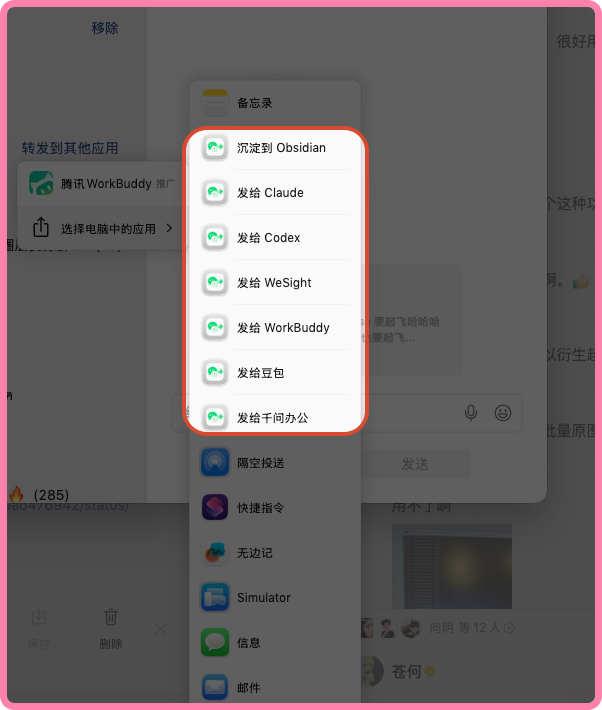
Source: a macOS share-menu screenshot posted by WeChatBridge maintainer Canghe on X. It shows choosing a destination app; not tested by JevLog.
1. Install and enable a share target
Section titled “1. Install and enable a share target”Install the signed app from GitHub Releases. Under Settings → Entry, enable Obsidian or an AI app already installed on your Mac.
2. Forward only the messages you need
Section titled “2. Forward only the messages you need”Select related messages in WeChat and choose Merge Forward → Share to Other Apps → WeChatBridge. It handles WeChat’s exported file; it does not read the WeChat database.
3. Use one fixed note format
Section titled “3. Use one fixed note format”Ask for the customer issue, answer already given, missing information, and next step. Mark dates or owners that are not in the chat as needing confirmation.
4. Check the chat before updating support records
Section titled “4. Check the chat before updating support records”Verify names, dates, promises, and action items. WeChatBridge does not create CRM tickets or send customer replies.
Check the result
Section titled “Check the result”Create a customer follow-up draft that can be checked against the original messages.
- Each follow-up item can be checked against its source message.
- Unclear dates and owners are marked for review.
- People approve replies and CRM changes.